 +
+
A creator sent the final video, the campaign performed well, and three teams now want to reuse it. Paid social wants a cutdown. Amazon wants the video on a product page. Email wants a GIF. The social manager remembers that the brand "bought the content," but nobody can find the approved channels or end date. This guide helps ecommerce and creator teams control influencer usage rights with a simple operating record. It explains what to capture, where KOLSprite can support the workflow, and when the team must stop and ask legal counsel or the creator.
Do not treat delivery as permission. Before reuse, match the exact asset with the agreement, approved channels, territories, dates, edit rights, paid-media terms, creator approvals, and any name or likeness permission. If one material field is unclear, pause that use.
A file in the drive is not a license in the record.
This article is an operations guide, not legal advice. Copyright and publicity rules vary by country, agreement, and use. The US Copyright Office explains that copyright initially belongs to the author of the work unless an applicable rule changes that result. A brand should not assume payment automatically transfers every right.
The practical response is to make the agreement specific and make the operating record match it. The International Trademark Association's influencer agreement worksheet highlights issues such as ownership, purpose of use, exclusivity, approval, revisions, and the use of a creator's name or likeness. Those are not back-office details. They decide whether a planned reuse is allowed.
TikTok also separates ordinary posting, brand-partner tagging, ad authorization, and platform content use. Its official content disclosure guidance explains how creators identify commercial content and tag a brand partner. Platform authorization is one part of the workflow. It does not silently expand the written agreement.
"The TikTok video" is often not one file. The campaign may contain a creator-posted version, a clean master, raw clips, still images, captions, music, voiceover, alternate hooks, a translated cut, and screenshots. Each asset can carry different permissions.
Assign every final and source asset a stable ID. Record the creator, campaign, product, filename, checksum or version, delivery date, public post URL, and storage location. If a cut changes, create a new version rather than overwriting the approved file. A rights check cannot work when the team cannot identify what it is using.
Music deserves special care. A creator may be able to publish a sound in an organic post while the brand cannot use the same track in an advertisement or outside TikTok. Do not assume the creator controls third-party music, footage, fonts, locations, or people appearing in the content.
| Field | What to record | Why it matters |
|---|---|---|
| Asset ID and version | Exact file and public-post reference | Prevents a license from being applied to the wrong edit |
| Owner or licensor | Party granting the permission | Shows who can answer or approve a change |
| Permitted channels | TikTok organic, paid social, Amazon, Shopify, email, retail, or other named use | "Digital" may be too vague for operations |
| Territory | Named countries or worldwide, if agreed | A global media team may exceed a regional license |
| Start and end | Effective date, term, and takedown deadline | Allows alerts and timely removal |
| Paid-media terms | Brand-handle ads, creator-handle authorization, budget or duration limits | Organic permission may not cover advertising |
| Edit rights | Cutdowns, crops, subtitles, translations, stills, voice edits, and required approvals | A small production change can create an unapproved asset |
| Name and likeness | Where the creator's identity can appear | The file license may not answer every publicity use |
| Exclusivity | Category, brands, territory, and period | Prevents a vague conflict rule from blocking unrelated work |
| Evidence | Signed agreement, amendment, platform authorization, and approval message | The team needs the source, not a memory of the source |
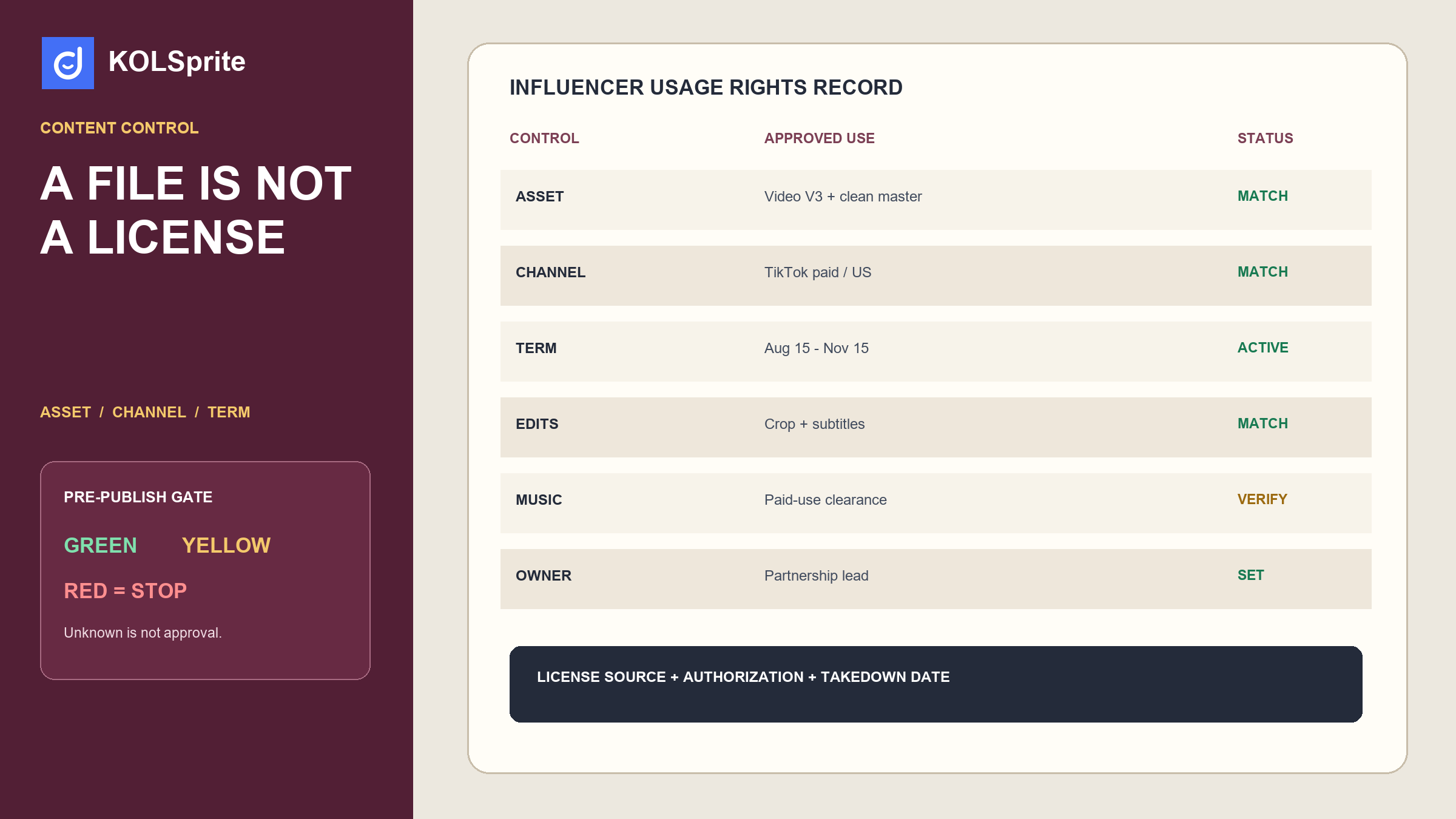
The rights record becomes useful when a marketer requests an action. Test the request against the record. Do not ask, "Do we own this?" Ask, "May we use asset V3 on the US Amazon product page from August 15 through November 15, with subtitles and a cropped first scene?"
Mark the request green when the exact asset, channel, territory, date, edits, and identity use are clearly covered. Mark it yellow when the agreement may cover the use but one field or approval is missing. Mark it red when the term expired, the channel is excluded, a third-party element is unresolved, or the requested edit exceeds permission.
A yellow status is not permission. It is an owner and a question. For example: "Partnership lead to confirm whether Amazon product-page use is included in 'brand-owned ecommerce channels' before August 12."
Assume a creator delivered a 28-second TikTok video for a kitchen product. The agreement allows the creator's organic post and three months of paid TikTok use in the United States. It permits captions and aspect-ratio changes but requires approval for new voiceover. Two months later, the Amazon team asks for a 15-second cut on the product page, and the email team requests a looping GIF.
| Requested use | Status | Reason | Next action |
|---|---|---|---|
| Run the approved TikTok post as an ad during the licensed period | Green, after platform authorization | Channel, territory, term, and asset match | Record authorization ID and ad end date |
| Cut the video to 15 seconds for Amazon | Yellow | Editing may be allowed, but Amazon is not a named channel | Request a written channel amendment |
| Create an email GIF | Yellow | Email and still-frame extraction are not stated | Confirm both channel and edit permission |
| Add a new product claim in voiceover | Red until approved | New voiceover needs creator approval and the claim needs brand review | Do not publish the edit |
| Continue the ad after the three-month term | Red | The permission expired | Renew or stop the campaign and remove the asset |
The example shows why one checkbox marked "usage rights: yes" is not enough. Rights are a set of conditions attached to a specific use.
TikTok's Content Suite guidance explains that marketers can find content that mentions their brand and request authorization to use eligible posts in ads. Authorization enables a platform action. The written agreement should still cover the business terms, scope, edits, compensation, and any other required permission.
Save the authorization ID, creator, post ID, approving account, start, end, and campaign. Link it to the signed agreement and asset record. If the creator revokes access or the agreement ends, the media owner should receive an alert.
Do not place contract files or personal information in a public content-research board. Restrict access according to your company's security policy. The operating record can point to the controlled source without exposing it to every user.
KOLSprite can help the team discover the creator, save public creator and video evidence, keep stable IDs, record relevant product or content examples, and organize partnership work in the workbench. That context makes it easier to know which creator, post, and campaign a rights record belongs to.
KOLSprite is not a law firm, copyright registry, contract-signing system, digital-rights enforcement tool, or substitute for legal review. It should not declare that a brand owns content. Use it for the research and collaboration trail, then connect the approved agreement and authorization references maintained in the proper system.
A clean handoff might contain the KOLSprite creator ID, handle, selected source videos, proposed role, campaign ID, asset IDs, rights-record owner, and status. The sensitive agreement remains in the approved contract repository.
Every approved use needs an owner and a takedown date. Schedule reminders far enough ahead to renew, replace, or stop the asset. A common cadence is 30 days before expiry, seven days before expiry, and the end date. The right cadence depends on media spend and channel operations.
Include derivatives. If a master expires, the system should identify its cutdowns, GIFs, translated versions, stills, and product-page placements. The owner must know where the asset is live, not only where the file is stored.
For paid media, compare the authorization end date with the contract term and campaign schedule. Use the earliest valid end date. Do not rely on a platform campaign remaining technically active as proof that continued use is allowed.
New requests appear after performance data arrives. A strong post may attract a retail team, another country, or a different media channel. Route every new use through the same request format. If the business wants broader rights, negotiate an amendment rather than quietly widening the interpretation.
Record declined requests as well. They show where future briefs should be clearer and where the business repeatedly needs a broader package. The information can improve budgeting without pressuring a creator to give away rights that were not priced.
Use the TikTok influencer contract guide before signing so deliverables, approvals, disclosure, and content terms are discussed early. Use the creator negotiation guide when scope or reuse changes the price. After launch, the TikTok UGC strategy guide can help the team place approved assets inside a repeatable content program.
These are separate jobs. The contract establishes the agreement. The rights record translates it into daily controls. The campaign tracker shows what happened. Keeping them linked creates a usable trail without forcing one tool to do all three.
If the reviewer cannot answer one material question from the source record, pause. The cost of a short clarification is usually lower than the cost of removing a live campaign across several channels.
Start with the file. Read the asset ID. Open the exact version. Do not use a copy with no clear source.
Name the place where the file will run. Be exact. "Amazon US product page" is better than "web." Name the start date. Name the end date.
List each change. Will the team crop it? Cut it? Add text? Add a new voice? Pull out a still? Change the song? Each change needs a clear yes.
Check paid use. Check the creator's name and face. Check the country. Check any third-party clip, song, person, or mark. Check the product claim.
Open the source proof. It may be the signed deal, a later note, or the platform grant. Make sure it covers this file and this use. A chat note with no link is not enough.
If all key fields match, mark the request green. Save the owner and stop date. If one key field is not clear, mark it yellow. Name the person who must ask. Set a due date. If the deal rules out the use, mark it red. Do not post it.
This check is short by design. It works because the full record was built first. It gives a busy media or shop team a clear way to act without guessing what the old deal meant.
If one line is hard to say, the record is not ready. Ask the person who owns that part. Save the reply with the source. Then run the check again.
Identify the exact asset and requested use. Match channel, territory, term, edits, paid media, identity, third-party elements, and evidence. Assign an owner and takedown date before publishing. Use KOLSprite to preserve creator and content context, then rely on the agreement, authorization, and appropriate professional review for permission. That is how influencer usage rights become an operating control instead of a forgotten contract line.
Create a KOLSprite account and claim a three-day trial. Save the creator and content evidence behind a campaign, then connect it to your approved rights-control record.
Register for a three-day KOLSprite trial
Share a blank rights-control structure or an anonymized use request. Never post contracts, private creator data, signatures, or confidential campaign terms.
 +
+
Review the rights checklist on Discord
Latest Articles

As an essential, data-driven toolkit for TikTok influencers and marketers, KOLSprite provides powerful features for effortless creator discovery, trending content identification, and actionable real-time insights.
It empowers users to make smarter decisions and significantly boosts their TikTok business.
 Refer & Earn